
Table of Contents
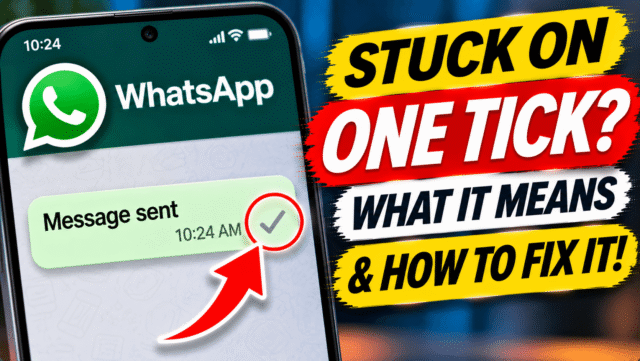
You send a message, and it sits there with a single grey tick. An hour later, still one tick. It is easy to jump to “they blocked me”, but most of the time that is not what is going on.
One tick has a precise meaning, and once you know it, you can usually work out the cause in a minute or two. This guide covers four things in order:
- what the ticks mean
- how to tell a switched-off phone from a block
- how to fix it when the problem is on your side
- the common case where other people’s messages to you get stuck on one tick
What One Tick Actually Means
WhatsApp uses four symbols next to every message you send:
- A clock: the message has not left your phone yet. This is almost always a problem with your own connection.
- One grey tick: the message reached WhatsApp’s servers, but it has not been delivered to the other person’s phone yet.
- Two grey ticks: the message has been delivered to their phone (or to one of their linked devices), but they have not opened it.
- Two blue ticks: they have read it.
So one tick means “sent, waiting to be delivered”. WhatsApp is holding your message and will hand it over the moment their phone connects. Nothing is lost.
In a group chat, the rules are stricter. You only see two ticks once every member has received the message, so a single member with their phone off keeps the whole message on one tick. To see who has received it and who has not, open the message info:
- On Android: press and hold the message, then tap Info.
- On iPhone: swipe left on the message.
Why a Message Stays on One Tick
If your message shows one tick, the delay is almost always on the other person’s side. The usual reasons:
- Their phone is switched off or the battery died.
- They have no signal or no internet, for example on a flight, in a basement, abroad without roaming, or with mobile data turned off.
- Their phone is blocking WhatsApp in the background. Aggressive battery saving on many Android phones, or Low Power Mode and Low Data Mode on an iPhone, can stop WhatsApp receiving messages until they open the app.
- They are using an old phone or have not opened WhatsApp since switching phones.
- They changed their number, deleted WhatsApp, or their account was banned or logged out.
- They blocked you.
Only the last one is personal. The others clear up on their own once their phone reconnects.
Is It Their Phone or Did They Block You?
WhatsApp deliberately does not tell you when someone blocks you, so there is no single test. What you can do is look at several signs together. According to WhatsApp, when someone blocks you:
- your messages only ever show one grey tick
- you stop seeing their status updates
- you stop seeing changes to their profile photo
Here is how I read the signs:
- One tick, but you can still see their profile photo, “last seen” or “online”: they have not blocked you. Their phone is probably off or offline. If you see them “online” and the tick still does not change, give it a few minutes, because WhatsApp may be delivering to a different device first.
- One tick for a few hours, and nothing else has changed: almost certainly a phone or connection issue. Wait.
- One tick for several days, plus everything else gone: their profile photo has disappeared, “last seen” and “online” are hidden, their status updates have stopped, and WhatsApp calls never ring. These together point strongly to a block.
Be careful with each sign on its own. Many people hide their last seen or profile photo from everyone in their privacy settings, and some hide them from specific contacts. A missing photo alone does not mean you are blocked. What counts is all the signs appearing together and staying that way.
Two other situations look like a block:
- They deleted WhatsApp or lost their phone: you get the same one tick and missing details, but they did not block you.
- They changed their number: your messages are going to an old account that nobody is checking.
If it really matters, the kind thing to do is to send a normal text message or call them, not to keep testing WhatsApp.
If Your Messages Show a Clock, the Problem Is Yours
A clock instead of a tick means WhatsApp could not send the message from your phone at all. Work through this:
- Open a website in your browser. If it does not load, the problem is your connection. Switch between Wi-Fi and mobile data, or turn Airplane mode on and off. If your Wi-Fi shows connected but nothing loads, our guide to Wi-Fi connected but no internet will help.
- If the phone says No SIM or Emergency calls only, see our guide on no SIM, no service or emergency calls only.
- Make sure mobile data is allowed for WhatsApp. On iPhone, go to Settings > Mobile Service (or Cellular) and check WhatsApp is turned on. On Android, go to Settings > Apps > WhatsApp > Mobile data and turn on Background data.
- Update WhatsApp from the App Store or Play Store. Very old versions can stop connecting.
- Restart your phone.
Once your connection is back, the clock turns into a tick on its own. You do not need to send the message again.
When Your Friends’ Messages Get Stuck on One Tick
This one surprises people. Friends may tell you their messages showed one tick for hours, then suddenly delivered when you opened WhatsApp. If that keeps happening, your phone is stopping WhatsApp from running in the background. Your missed notifications are a symptom of the same thing.
On Android
Phone makers handle battery saving differently, so the exact names vary, but these are the settings to check:
- Go to Settings > Apps > WhatsApp > Battery (or App battery usage) and set it to Unrestricted, or turn off battery optimisation for WhatsApp.
- In the same WhatsApp app settings, open Mobile data (or Data usage) and turn on Background data. If you use Data Saver, add WhatsApp as an exception or turn Data Saver off.
- On Samsung phones, go to Settings > Battery (or Battery and device care) > Background usage limits and make sure WhatsApp is not in Sleeping apps or Deep sleeping apps. Some Samsung users have also found that their messages only arrived once Samsung Push Service was enabled.
- On Xiaomi, Redmi, Poco, Oppo, Realme, Vivo and OnePlus phones, look for an Autostart or Auto-launch setting and allow it for WhatsApp. Then set its battery saver option to No restrictions.
On iPhone
- Go to Settings > WhatsApp and turn on Background App Refresh. Also make sure Background App Refresh is not turned off for the whole phone under Settings > General > Background App Refresh.
- Turn off Low Power Mode in Settings > Battery when you are expecting messages, as it reduces background activity.
- Check Settings > Mobile Service (or Wi-Fi > your network) and turn off Low Data Mode if you do not need it.
You may need these battery savers on all the time because your battery drains so fast. If so, our guide on why your phone battery is draining fast is worth a look. Fixing the drain is better than starving WhatsApp of background time.
Coming in January 2027 (India): SIM Binding
If you or the people you message use WhatsApp with an Indian number, there is a rule change to know about. India’s Department of Telecommunications (DoT) has told messaging apps, including WhatsApp, Telegram and Signal, to keep each account linked to the active SIM card it was registered with. Platforms have until December 31, 2026 to comply, and the requirement is expected to apply from January 1, 2027.
In practice, the registered SIM will need to stay active and inside the phone that runs the app. That could catch out people who:
- use WhatsApp on an old phone with no SIM in it, often a parent or grandparent on a Wi-Fi-only handset
- moved their SIM to a new phone but kept WhatsApp on the old one
- let the registered number lapse, for example a second SIM they stopped recharging
If their WhatsApp stops receiving messages because of this, your messages to them will sit on one tick, just as if their phone were off.
What nobody knows yet is exactly how each app will enforce it. Reports suggest accounts are unlikely to simply stop working on January 1. The experience will depend on how WhatsApp implements the rule, including what happens on linked devices such as WhatsApp Web. The sensible step now is to make sure the SIM registered to WhatsApp is active, recharged and in the phone where WhatsApp is installed. We will update this section once WhatsApp confirms how it will work.
What Happens to a Message That Stays on One Tick?
WhatsApp keeps undelivered messages on its servers for a limited time, often reported as about 30 days. It delivers them as soon as the other person’s phone reconnects. If their phone stays offline beyond that, the message may never arrive, even though it still shows one tick on your side.
That has two practical consequences:
- If a message is important and has been on one tick for days, send it another way too, such as a normal text, email or call.
- If you delete a one-tick message using Delete for everyone, it is removed before they ever see it, because it never reached their phone.
A Word on “Who Blocked Me” Apps
Search for this topic and you will find apps and websites that promise to tell you who blocked you, show who viewed your profile, or track someone’s WhatsApp activity. None of them can see inside WhatsApp. At best they guess from the same public signs described above. At worst they are scams that harvest your number or try to get your WhatsApp verification code, which is how accounts get stolen. Our guide to common WhatsApp scams covers the code trick in detail.
Quick Answers
What does one grey tick mean on WhatsApp?
It means your message has been sent and reached WhatsApp’s servers, but it has not been delivered to the other person’s phone yet. It turns into two ticks as soon as their phone connects.
Does one tick mean I am blocked?
Not on its own. One tick is also what you see when their phone is off, has no internet, or is restricting WhatsApp in the background. A block is likely only if the tick stays for days and everything else has disappeared too: their profile photo, last seen, online status and status updates.
Why is my message on one tick when they are online?
Usually because delivery takes a moment to catch up. They may also be online on a linked device such as WhatsApp Web while their phone, the one that has not received it yet, is offline. If it stays that way for a long time, their phone may be restricting WhatsApp in the background.
What does the clock mean on WhatsApp?
The clock means the message has not left your phone yet. Check your internet connection, mobile data permissions and WhatsApp updates. The message sends automatically once you are back online.
How long does WhatsApp try to deliver a one-tick message?
WhatsApp holds undelivered messages for a limited period, commonly reported as about 30 days. If the other person’s phone stays offline longer than that, the message may never be delivered.
Why do people say my WhatsApp messages only deliver when I open the app?
Your phone is stopping WhatsApp from running in the background. On Android, set WhatsApp’s battery usage to Unrestricted and allow background data. On iPhone, turn on Background App Refresh for WhatsApp and turn off Low Power Mode and Low Data Mode.
Why does my group message show one tick?
In a group, the second tick only appears once every member has received the message. To see which members have not received it yet, press and hold the message and tap Info on Android, or swipe left on it on iPhone.
Will WhatsApp stop working without a SIM in India?
India’s SIM-binding rule requires messaging apps to keep accounts linked to the active registered SIM. The compliance deadline is December 31, 2026, and the rule is expected to apply from January 1, 2027. Exactly how WhatsApp will enforce it is not confirmed yet, but keeping the registered SIM active and in the phone running WhatsApp is the safe step.
Can someone read my message if it shows one tick?
No. One tick means the message has not reached their phone, so they cannot see it yet. If they have read receipts turned off, the ticks stay grey after they read it instead of turning blue. You still see two ticks, never just one.