Table of Contents
If you use ChatGPT for free, you may have started seeing something new under its answers: a small box marked “sponsored.” ChatGPT now has ads.
OpenAI began testing ads in the US in February 2026. They reached 31 European countries in late August, and on August 27 OpenAI announced ads for ChatGPT users in India. Indian users are a big part of this. ChatGPT has more than 100 million weekly users in India, and most of them use the free or low-cost Go plans that now carry ads.
Here’s who sees them, what ChatGPT uses to pick them, what advertisers actually get, and the settings that put you back in control.
Who Sees Ads in ChatGPT
Ads appear only on the Free and Go plans. If you pay for Plus or Pro, or use ChatGPT through a Business, Enterprise or Edu account at work or school, you won’t see them.
OpenAI also says it doesn’t show ads to users under 18.
The rollout is gradual, so not everyone on a free plan sees ads yet, even in countries where they’ve launched.
Where Ads Appear and What They Look Like
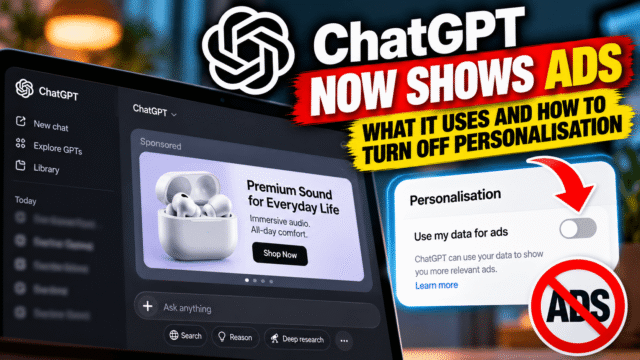
Ads show up below ChatGPT’s answer, labelled as sponsored and visually separated from the response. They don’t appear inside the answer text.
OpenAI also says it keeps ads away from conversations about personal health, mental health and politics. So if you’re asking about symptoms, a stressful situation or an election, you shouldn’t see an ad next to the answer.
Do Ads Change ChatGPT’s Answers?
OpenAI says no. Its position is that ads run on separate systems from the chat model and don’t influence what ChatGPT tells you.
There’s no way for an ordinary user to check that independently. A sensible habit: when an answer recommends a product or service, pay attention to whether the suggestion comes from the answer itself or from the sponsored box underneath.
What ChatGPT Uses to Pick Your Ads
This is the part most people want to know. ChatGPT chooses ads using:
- What you’re talking about in the current conversation
- Your general location and language
- If personalisation is on, your past chats and ChatGPT’s memory of you
That last point matters. If ChatGPT remembers that you’re planning a wedding, renovating a kitchen or shopping for a laptop, ads can reflect that across future conversations, not just the current one.
In the European Economic Area and Switzerland, personalised ads aren’t available at first. Ads there are based only on the current conversation.
What Advertisers Get, and What They Don’t
OpenAI is clear on this point. Advertisers never receive your chats, chat history, memories, name, email address, precise location, IP address or other sensitive information. OpenAI says it doesn’t sell your data to advertisers. Companies running ads get only overall performance numbers, such as how many people saw or clicked an ad.
So the advertiser doesn’t learn who you are. ChatGPT itself, though, uses what it knows about you to decide which ad to show. That’s the part you can switch off.
How to Turn Off Ad Personalisation
Open ChatGPT, go to Settings, then Ad Controls. You’ll find these options:
- Personalize ads: turn this off so ads are based only on the current conversation, not on what ChatGPT knows about you over time.
- Past chats and memory: turn this off to stop ChatGPT using your earlier conversations and saved memories to pick ads, even if you leave some personalisation on.
- View history and topics: see which interests ChatGPT has linked to your ads.
- Delete ads data: clear the ad-related data ChatGPT has built up about you.
If you only change one thing, turn off Past chats and memory. That keeps ChatGPT’s memory working for your actual conversations without feeding it into advertising.
Controls on Each Ad
Every ad has a three-dot menu with a few useful options:
- Hide ad, if it’s irrelevant or annoying
- Report ad, if it looks misleading, inappropriate or like a scam
- About this ad, to see why you were shown it
- Ask ChatGPT, to ask questions about the product in the ad
Use Report ad freely. Scammers target every new ad platform, and reports are how bad ads get removed.
How to Avoid Ads Completely
You have three options, each with a trade-off:
- Upgrade to Plus or Pro. No ads, and you get the full set of features, but it costs a monthly fee.
- Switch to the Ads-Free tier. OpenAI offers a free option without ads, but it comes with lower usage limits and fewer features. Fine for occasional questions, frustrating if you rely on ChatGPT daily.
- Use a work or school account. Business, Enterprise and Edu accounts don’t show ads, if your organisation provides one.
For most people who use ChatGPT a few times a week, the simplest answer is to stay on the free plan and turn off personalisation. You’ll still see ads, but they’ll be based on what you’re asking right now, not on everything ChatGPT knows about you.
Should You Be Worried?
Ads in ChatGPT work much like ads in Google Search or Gmail: a free product paid for by advertising. The difference is that people share far more personal detail with a chatbot than they type into a search box. That’s why the personalisation settings matter more here than almost anywhere else.
Treat ChatGPT the way you’d treat any free service with ads. Don’t share things you wouldn’t want used to shape what you’re shown. Turn off what you don’t need. And remember that a sponsored suggestion is still an advertisement, however helpful it looks.
Quick Answers
Does ChatGPT show ads now?
Yes, on the Free and Go plans. Ads began in the US in February 2026, reached Europe in August, and OpenAI announced ads in India on August 27, 2026. Plus, Pro and work or school accounts don’t show ads.
Does ChatGPT share my chats with advertisers?
No. OpenAI says advertisers never receive your chats, memories, name, email, precise location or IP address. They only get overall performance figures for their ads.
How do I turn off personalised ads in ChatGPT?
Go to Settings, then Ad Controls, and turn off Personalize ads. To stop ChatGPT using your past conversations for ads, also turn off Past chats and memory. You can delete ads data there too.
How do I remove ads from ChatGPT?
Upgrade to Plus or Pro, use a Business, Enterprise or Edu account, or switch to the free Ads-Free tier, which has lower usage limits and fewer features.
Do ads affect ChatGPT’s answers?
OpenAI says ads run on separate systems and don’t influence answers. Ads appear below the response, labelled as sponsored.
Are ads shown to teenagers on ChatGPT?
No. OpenAI says it doesn’t show ads to users under 18, and ads are kept away from health, mental health and political conversations.
Bottom Line
Ads are now part of free ChatGPT in India and most major markets, and they’re here to stay. Advertisers don’t see your chats, but ChatGPT does use what it knows about you to pick ads unless you tell it not to. Take two minutes to open Settings, then Ad Controls, and turn off Past chats and memory, or all personalisation. Then use ChatGPT as before, with one extra habit: notice which suggestions come from the answer and which are paid for.