Table of Contents
Search for Google privacy advice and you’ll find two flavours: thirty-item checklists that treat every toggle as equally urgent, and doom pieces insisting nothing you do matters. Neither helps, because the truth is narrower and more useful. A handful of settings genuinely change what Google collects and keeps about you. Several popular ones change almost nothing. And a few things you’d want to control simply have no switch at all.
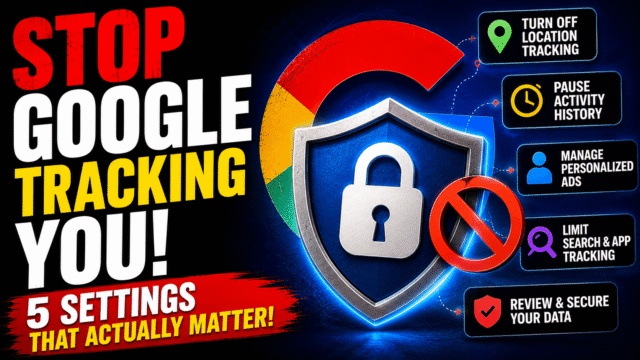
Here’s the honest sorting: the four settings that actually matter, the one nobody bothers with that quietly does the most work, what changed this August, and where the limits genuinely sit. Fifteen minutes total.
What Google Actually Collects
Start with an accurate picture, because both the panic and the complacency come from getting this wrong.
Google logs your searches, the sites you visit in Chrome while signed in, your app usage on Android, your YouTube watching, and your location. That feeds ad targeting and recommendations. What it doesn’t do, by its own stated policy, is use the content of your Drive files, Gmail, and Photos for advertising, or use sensitive categories like health, race, religion, or sexual orientation to target ads.
That distinction matters because the popular fear (Google reading your emails to sell you things) is aimed at the wrong place. The real machinery is behavioural: what you searched, where you went, what you watched. Which is also why the ads can feel telepathic without anything listening to you, a mechanism we’ve unpacked in detail elsewhere.
The Four Settings That Matter Most
Everything below lives at myactivity.google.com or myadcenter.google.com. Do these in order; the first two do most of the work.
1. Web & App Activity. This is the big one, logging searches, Chrome browsing while signed in, and Android app usage. Go to myactivity.google.com, open Web & App Activity, and either turn it off entirely (choosing “Turn off and delete activity”, and deselecting the subsettings) or, if you want to keep some personalization, set an auto-delete window. One 2026 wrinkle: in June, Google split part of this into separate Search Services History and Search Services Personalization controls, so check both rather than assuming one covers everything.
2. Location History (now Timeline). Off by default for newer accounts, but check yours. On recent Android versions this data now lives on your device rather than Google’s servers, which is a genuine improvement, though your general location is still estimated and saved with your activity when you use Google services.
3. YouTube History. Both watch and search history feed recommendations and ad targeting. Turning it off means worse recommendations, which for many people is a fair trade and for others isn’t; that’s a preference, not a security decision.
4. Ad personalization. At myadcenter.google.com, open Manage Privacy and turn off personalized ads. While you’re there, review the separate switches for Activity on sites and apps, YouTube History, and Areas where you’ve used Google, each of which independently feeds ad targeting. You can also reduce ads on sensitive topics like alcohol, gambling, dating, pregnancy, and weight loss, which is a small feature that matters a lot to some people.
Auto-Delete: The Setting Nobody Turns On
This is the one I’d argue is the highest value-per-second in the whole exercise, and almost nobody touches it.
Rather than choosing between “Google knows everything” and “Google knows nothing,” auto-delete caps how far back the record goes. In each activity setting, choose an auto-delete window of 3, 18, or 36 months. Google now defaults new accounts to 18 months for core activity, but if your account is older, it may still be keeping everything since the day you created it. Set it to 3 months and you keep functioning recommendations while a decade of history quietly disappears.
Do the same for Gemini Apps Activity, which is auto-deleted after 18 months by default and adjustable to 3.
While you’re in there, the fastest cleanup of what already exists: myactivity.google.com lets you delete by date range, or use Delete all time on the activity types you don’t want retained.
The August 2026 IP Address Change
New this month, and worth knowing precisely. From August 3, Google began using IP addresses for ad measurement and personalization for users in the UK, EEA, and Switzerland, registering the change under the industry framework covering identification of devices from automatically transmitted data.
The honest part: there’s no dedicated opt-out control for this at launch, with reporting suggesting user-facing controls may not arrive until late 2026 or early 2027. In the meantime the available levers are the ad personalization settings above and declining non-essential cookies. A VPN does break the specific link this policy relies on, since it replaces your visible IP, though it doesn’t touch account activity or other signals, which fits the honest scope of what VPNs actually do.
It’s also a reversal worth noting plainly: Google spent years arguing that using signals like IP addresses to identify devices was the wrong approach to privacy, and the UK’s data regulator publicly criticised the related fingerprinting decision that preceded this one.
What These Settings Don’t Fix
The part the checklists skip.
Turning off ad personalization doesn’t reduce the number of ads, only their relevance. You’ll see just as many, targeted more crudely.
These settings govern personalization more than collection. Google still processes data to deliver services, detect fraud, and meet legal obligations; you’re limiting what’s retained and what’s used to profile you, not achieving invisibility.
Turning off ad activity doesn’t stop personalized recommendations elsewhere on Google services like Search; those are separate systems with separate controls.
Incognito mode doesn’t hide you from Google when you’re signed in, and never did. It’s local-history control, not network privacy.
Other trackers keep working. Google is one company among thousands in the tracking ecosystem, which is why the settings that matter most for your ad experience are spread across your devices, your browser extensions, and even your television.
The 15-Minute Privacy Checkup
If you do nothing else: myaccount.google.com/privacycheckup walks you through most of the above in a guided flow, and myactivity.google.com is where the auto-delete windows live. Set activity auto-delete to 3 months, turn off ad personalization at myadcenter.google.com, decide honestly whether you want Location History and YouTube History, and glance at your Google account’s connected apps to revoke anything you no longer use. Then put a calendar note for a year from now, because Google reorganises these menus regularly and new settings arrive switched on.
Quick Answers
Which Google privacy setting matters most?
Web & App Activity, since it captures searches, Chrome browsing while signed in, and Android app usage. Turning it off or setting a short auto-delete window does the most in one step.
Does turning off ad personalization stop Google tracking me?
No. It changes how your data is used for targeting, not whether activity is collected. Pair it with activity settings and auto-delete for real reduction.
Can Google read my Gmail and Drive files for ads?
Google’s stated policy is that content in Gmail, Drive, and Photos isn’t used for advertising. Gmail’s AI features do process email content to provide features, which has its own separate off switches.
What is the August 2026 IP address change?
From August 3, Google began using IP addresses for ad measurement and personalization for UK, EEA, and Swiss users. There’s no dedicated opt-out yet; controls are expected later.
How long does Google keep my activity?
Newer accounts default to 18 months of auto-delete for core activity, but older accounts may retain everything. You can set 3, 18, or 36 months per activity type.
The Bottom Line
Four settings do nearly all the work: Web & App Activity, Location History, YouTube History, and ad personalization, with an auto-delete window as the quiet fifth that shrinks a decade of history to a quarter. Everything beyond that is either a preference or theater, and it’s worth knowing which is which so you spend fifteen honest minutes rather than an afternoon flipping switches that change nothing. What these settings can’t give you is invisibility from a company whose products you use daily; what they can give you is a much shorter record, far less profiling, and the specific knowledge of where the real limits sit, including the IP change this month that currently has no off switch at all.