Table of Contents
The email arrives with that special dread: your information was involved in a data breach. Or a friend sends you a headline about billions of leaked passwords, you check a website, and there’s your address, flagged in six breaches you’ve never heard of.
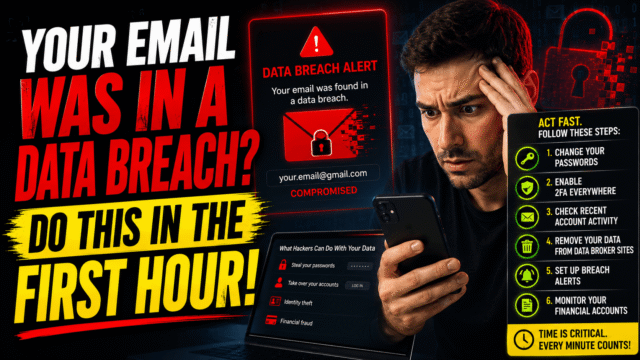
Take a breath, because the first hour matters and panic wastes it. The correct response isn’t “change all your passwords immediately,” it’s a short triage: confirm the alert is real, figure out what actually leaked, and then act in an order that matters, because for one common breach type, rotating passwords first is precisely the wrong move. Here’s the whole playbook.
First: Verify It’s Real (Two Traps Catch People Here)
Trap one: fake breach alerts. Scammers know breach panic converts, so phishing emails dressed as security warnings, complete with urgent “secure your account” buttons, are a standard lure. The rule: never act through links in an alarming email. Instead, go verify independently at the source of truth, Have I Been Pwned (haveibeenpwned.com), the free service run by security researcher Troy Hunt that indexes nearly a thousand breached sites. Type your email, see exactly which breaches contain it and what data types each exposed. While you’re there, click “Notify me,” which gives you free automatic alerts for every future breach, one of the best two-minute security setups that exists. Worth knowing since guides haven’t caught up: Google retired its own Dark Web Report feature this February, so HIBP alerts are the replacement.
Trap two: old data wearing a new headline. The scariest-sounding breach stories are often recycled. The famous “16 billion passwords leaked” story was substantially a compilation of years-old stolen credentials repackaged, and a later 183-million-credential dataset turned out to be 91% previously known material. So check the dates on your HIBP results: an entry from a 2019 breach of a site you left in 2020, with a password you’ve since changed, is history, not an emergency. What deserves your next hour is anything recent, anything containing a password you still use, and one special category below.
Triage by What Actually Leaked
HIBP tells you the “compromised data” types per breach. Your response tree:
Passwords leaked (the common case): proceed to the rotation order in the next section. One nuance: breached passwords are usually stored hashed, but weak and reused ones get cracked at industrial scale, so treat a leaked password as burned regardless.
“Stealer logs” in the breach name (the special case that changes everything): stop, because this isn’t a company that got hacked, it’s evidence that a device you use, or used, was infected with password-stealing malware that harvested logins straight from your browser. Rotating passwords from an infected machine just delivers the new ones to the same criminal. The correct order flips: first run a full malware scan (Windows Defender’s offline scan is a fine start) or establish the logs came from an old, retired device, then change passwords from a clean machine. This ordering mistake is invisible in most advice and it’s the one that keeps victims in the loop.
Email plus personal details, no passwords: no accounts are directly compromised, but you’ve been loaded into targeting databases. Your risk is the personalized phishing wave covered below, and the fix is awareness, not password churn.
Financial or identity data (cards, government IDs): everything above, plus the financial section further down. This is the tier where the recent breach letters from payment and retail companies land.
The Password Rotation Order That Matters
Don’t change fifty passwords in a panic sweep; change the right ones in the right order.
- The breached account itself. Obvious, immediate.
- Every account where you reused that password. This is the real danger, because criminals run leaked email-password pairs against hundreds of major sites automatically, a technique called credential stuffing, and reuse is what turns one leaked forum password into a drained account elsewhere.
- Your email account, regardless. It’s the master key that resets everything else, so it gets a unique password and, ideally, the upgrade below, even if it wasn’t directly in this breach.
- Banking and payment logins, then everything important as you naturally log in.
Two upgrades while your hands are in there, since they end this cycle rather than patching it: turn on two-factor authentication wherever it’s offered, and put passkeys on your critical accounts, which are immune to both leaks and the phishing that follows them, exactly as we’ve laid out before. You can also check any individual password’s breach history through HIBP’s Pwned Passwords tool, which searches safely without ever transmitting your actual password.
The Phishing Wave That Follows Every Breach
Here’s what the first-hour guides skip: for most people, the danger isn’t a hacker manually attacking their accounts, it’s the aftermarket. Your leaked details get packaged and sold, and what follows over weeks is personalized phishing: emails that address you by name, reference the breached company, or arrive as fake “compensation” and “account security” notices about the very breach that exposed you. Knowing your data is in circulation is genuinely useful armor, because the manipulation patterns are recognizable once named, and we’ve catalogued exactly those patterns in our scams guide. The one-line version: any urgent message asking you to click, pay, or share a code gets verified through the official app or site you navigate to yourself, never through the message.
And if the worst happens and someone actually gets into your email despite everything, that’s a different emergency with its own ordered response, which we’ve covered in the account recovery guide, hacked branch first.
Financial Data: The Extra Steps
When cards or identity documents leaked: turn on transaction alerts at your bank and card apps so anomalies surface in minutes, not statements. Watch for small “test” charges, which precede big ones. In the US, a credit freeze at the three bureaus is free, takes minutes each, and blocks new accounts being opened in your name, with identitytheft.gov as the official recovery path if fraud materializes; elsewhere, your bank’s fraud line and your national cybercrime channel (India’s 1930 helpline, for our readers there) are the equivalents. Replace a leaked card at the first suspicious charge rather than the fifth; issuers do this routinely and painlessly.
What You Can’t Undo (and Why That’s Survivable)
The honest closing truth: you cannot un-leak anything. Your email address, once breached, is in circulation permanently, and if you’ve used it for years, it was almost certainly in breaches before this one. That sounds bleak and actually points somewhere practical: since leaks are inevitable, the winning strategy is making leaked data useless. A unique password per site means any single breach burns one login instead of your whole life. Two-factor and passkeys mean even a burned password opens nothing. Breach alerts mean you hear about the next one in hours instead of years. Build that once and future breach notifications downgrade from emergencies into mild chores, which is, genuinely, the entire endgame of personal security.
Quick Answers
How do I check if my email was in a data breach?
Enter it at haveibeenpwned.com, the free industry-standard index. It lists each breach and what data types were exposed, and can alert you automatically to future ones.
My email is in a breach but the password was old. Am I safe?
If that password is retired everywhere and the breach is years old, largely yes. Recent breaches, reused passwords, and stealer-log entries are what demand action.
What does “stealer logs” mean in my breach results?
That malware on a device harvested your logins directly. Scan and clean your devices before changing passwords, or the new ones get stolen too.
Should I delete my email address after a breach?
Almost never necessary. Unique passwords plus two-factor make a leaked address survivable; a fresh address only helps in extreme cases of decade-long reuse across everything.
How do criminals actually use leaked emails and passwords?
Automated credential stuffing against major sites, and targeted phishing that references the breach to seem legitimate. Reuse and urgency-clicking are the two behaviors they’re betting on.
The Bottom Line
A breach notification is a starting gun, not a verdict. Spend the first hour on triage rather than terror: verify through Have I Been Pwned instead of any email link, read what actually leaked and when, and respond accordingly, passwords in priority order for the common case, malware scan first for the stealer-log case, and fraud alerts plus freezes when money data is involved. Then spend one more evening on the permanent fix, unique passwords, two-factor, passkeys, and breach alerts, so that the next notification, and there will be a next one, costs you five minutes instead of a week of panic. Leaks are the weather now. The goal was never to stop the rain; it’s to stop getting wet.