
Table of Contents
One minute your phone works. The next, the signal bars are gone and the top of the screen says No SIM, No Service, Searching, SOS or Emergency calls only. You can’t make calls, mobile data has stopped, and OTPs aren’t arriving.
These messages look alike, but they point to different problems. Here’s what each one means, and the order I work through to get a phone back on the network, starting with the 15-second fixes.
What the message is telling you
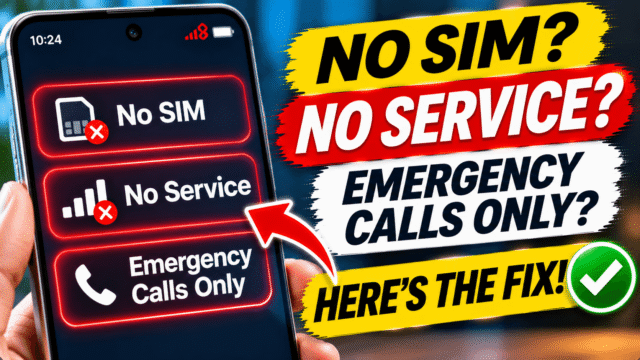
- No SIM, No SIM card or Invalid SIM: the phone can’t detect your SIM card, or the eSIM isn’t active.
- No Service or Searching: the phone sees your SIM but can’t connect to your carrier’s network.
- SOS or SOS only (iPhone) and Emergency calls only (Android): the phone can’t connect to your own network, but it can reach another carrier’s network for emergency calls.
Whichever you see, the first few steps are the same.
Step 1: Turn Airplane mode on and off
This forces the phone to search for the network again.
- Turn on Airplane mode from Control Center (iPhone) or Quick Settings (Android).
- Wait at least 15 seconds.
- Turn it off and give the phone a minute to find the network.
If you’re indoors, in a basement or in a lift, move near a window or outdoors first. Check with someone on the same network nearby: if their phone has no signal either, the problem is coverage or an outage, not your phone.
Step 2: Restart your phone
A full restart clears glitches that Airplane mode doesn’t. Turn the phone off completely, wait 30 seconds, and turn it back on.
Step 3: Check the line is switched on
On phones with two SIMs or an eSIM, a line can be switched off by accident.
- iPhone: go to Settings, then Mobile Service (or Cellular). Tap your line and make sure it’s on. If it isn’t, tap Turn On This Line.
- Samsung: go to Settings, then Connections, then SIM manager, and make sure the SIM is switched on.
- Pixel and most other Android phones: go to Settings, then Network and internet, then SIMs, and check the SIM is turned on.
If you’re travelling abroad, also turn on Data Roaming. Without it, many phones won’t connect to a network in another country.
Step 4: Take out the SIM and put it back
If the message says No SIM or Invalid SIM, the SIM may have moved slightly or picked up dust.
- Turn the phone off.
- Use the SIM tool or a straightened paper clip to eject the tray. Don’t force it.
- Check the SIM for scratches, cracks or bent edges, and wipe the gold contacts gently with a dry, soft cloth.
- Put it back the right way round and push the tray in until it closes fully.
- Turn the phone on.
Use the tray that came with your phone. Apple warns that a tray from a different model or brand may not fit properly.
To test whether the problem is the SIM or the phone, try your SIM in another phone, or another working SIM in your phone. Whichever one fails is the culprit.
On Samsung phones, you can see whether the SIM is detected in Settings, then About phone, then Status information, then SIM card status.
Step 5: Using an eSIM? Check it’s still there
If your phone uses an eSIM, there’s no card to reseat. Go to your mobile service or SIM settings and check that your eSIM is listed and switched on.
If it’s missing, it may have been deleted, or it may have moved to another phone during a transfer. Only your carrier can reissue it. Contact them through their app, website or a store, and have your ID ready.
Step 6: Install updates and carrier settings
Carriers release settings updates that can fix connection problems.
- iPhone: connect to Wi-Fi, go to Settings, then General, then About. If a carrier settings update is available, you’ll see a prompt to update. Also install any iOS update in Settings, then General, then Software Update.
- Android: install any system update in Settings, then System, then Software update (or Software update on Samsung).
Apple says that if you’ve just put in a SIM from a new carrier, you need to download that carrier’s settings.
Step 7: Check your network settings
Network mode
On Android, the phone may be set to a network type your carrier doesn’t support where you are.
- Samsung: go to Settings, then Connections, then Mobile networks, then Network mode, and choose the option that includes 5G, LTE, 3G and 2G with auto connect.
- Pixel and others: go to Settings, then Network and internet, then SIMs, choose your SIM, then Preferred network type, and pick the highest option, such as 5G or 4G.
Choose your network automatically
If you’ve ever selected a network manually, the phone may be stuck trying to connect to the wrong one. On Samsung, go to Settings, then Connections, then Mobile networks, then Network operators, and tap Select automatically. On other Android phones, look for Automatically select network in your SIM settings and switch it on.
Step 8: Is your SIM locked with a PIN?
If you see “SIM locked” or “Enter SIM PIN”, your SIM has a PIN set. Enter it carefully. After three wrong attempts, the SIM asks for a PUK code instead.
Don’t guess the PUK. Too many wrong attempts can block the SIM permanently. Get the PUK from your carrier’s app, website or customer service, which can give it to you after checking your identity.
Step 9: Check your account with your carrier
If the phone and SIM seem fine, the problem may be on the carrier’s side. Apple’s own advice is to check with your carrier that:
- Your account is active and paid up
- There’s no outage in your area
- Your phone isn’t blocked or barred from the network
Common causes include an unpaid bill, an expired prepaid plan, a SIM that’s been replaced (the old one stops working), or a number that was deactivated for not being used.
In India: prepaid numbers you don’t use
If you have a second SIM you rarely use, check it hasn’t lapsed. TRAI’s rules say a prepaid number can’t be deactivated for less than 90 days of non-use.
After that, a balance of ₹20 buys you time, but it gets used up. If the number stays inactive for more than 90 days and has at least ₹20 of prepaid balance, the operator can deduct up to ₹20 to keep it active for another 30 days, and keep doing that each month. Once the balance runs out, you get a 15-day grace period to reactivate the same number before it can be given to someone else. Outgoing services may also stop sooner, when your plan’s validity ends.
The free way to keep a number alive is to use it. TRAI counts a voice or video call (incoming or outgoing), an outgoing SMS, or using mobile data as activity, and any of these resets the 90-day clock. A short call or a single text from that SIM every couple of months is enough.
Operators apply these rules in slightly different ways, and some ask for a minimum recharge to reactivate a lapsed number. Check your own carrier’s terms in its app or on its website.
If you’ve just replaced your SIM in India, remember that SMS is blocked for 24 hours after a SIM swap, although calls should work.
Phone bought abroad?
Apple notes that some countries require you to register a phone’s IMEI before it can be used on local networks, especially if you bought it in another country. Your carrier can tell you if this applies.
Also check your phone isn’t locked to a different carrier. On iPhone, go to Settings, then General, then About, and look for No SIM restrictions next to Carrier Lock. If it’s locked, only the original carrier can unlock it.
Step 10: Reset network settings
If nothing else has worked, reset your network settings. This clears saved Wi-Fi networks, Bluetooth pairings and mobile settings, but not your photos, apps or messages.
- iPhone: Settings, then General, then Transfer or Reset iPhone, then Reset, then Reset Network Settings.
- Samsung: Settings, then General management, then Reset, then Reset mobile network settings.
- Pixel and others: search Settings for “reset”, then choose the option to reset mobile network settings, or Wi-Fi, mobile and Bluetooth.
Restart the phone afterwards.
When it’s the SIM or the phone
- If your SIM works in another phone, but no SIM works in yours, the phone’s SIM reader or antenna may be faulty. Contact the phone maker or an authorised service centre.
- If your SIM doesn’t work in any phone, ask your carrier for a replacement SIM. It’s usually quick and cheap, and you keep your number.
- If the problem started after the phone was dropped or got wet, it’s likely hardware.
Quick Answers
What does Emergency calls only mean?
Your phone can’t connect to your own carrier’s network, but it can reach another network for emergency calls. It’s usually caused by weak signal, a SIM problem or an issue with your account.
What does SOS mean on my iPhone?
The same thing: your iPhone isn’t connected to your carrier, but you can still make emergency calls through another network.
Why does my phone say No SIM when the SIM is inside?
The SIM may be loose, dirty or damaged, the tray may not be closed properly, or the line may be switched off in settings. Reseat the SIM, check your SIM settings, and test it in another phone.
How do I fix No Service on Android?
Toggle Airplane mode, restart, check the SIM is switched on, set your network mode to the highest option with auto connect, select your network automatically, and reset mobile network settings if needed.
Can an unpaid bill cause No Service?
Yes. An unpaid bill, an expired prepaid plan or a deactivated number can all stop your service. Check with your carrier.
How do I stop my unused prepaid SIM being deactivated in India?
Use it. TRAI counts an incoming or outgoing call, an outgoing SMS or using mobile data as activity, which resets the 90-day clock. A ₹20 balance only buys extra time while it lasts, because operators can deduct it month by month.
Will resetting network settings delete my data?
No. It removes saved Wi-Fi networks, Bluetooth pairings and mobile settings, but not your photos, apps or messages.