Table of Contents
A £30 coin-sized tracker in your luggage is genuinely one of the best travel purchases available. The same device slipped into a coat pocket is a stalking tool, and that duality is why this topic deserves more than a product roundup.
So this guide covers both halves properly: how to choose and use a tracker, and how to check whether one is following you, what the alerts actually look like, and what to do if you find one, including a point where expert advice genuinely conflicts and you deserve to know why.
What Trackers Actually Do (and Don’t)
A Bluetooth tracker has no GPS and no cellular connection of its own. It broadcasts an encrypted Bluetooth signal, and any nearby phone on the relevant network anonymously relays its location back to the owner. That’s the whole trick, and it explains both the strengths and the limits.
Where they excel: finding things within a network of phones. In a city, where iPhones are everywhere, an AirTag in stolen luggage can report from a warehouse in another country. Keys down the back of a sofa, a bag left in a taxi, a suitcase that went to the wrong airport.
Where they fail: anywhere without people. A tracker in a remote field reports nothing until someone walks past. There’s no live GPS trail, only a series of sightings, and Apple’s network is far denser than the alternatives in most places.
Which to buy comes down to your phone, not the tracker’s features. AirTags work with Apple’s Find My network and need an iPhone to set up. Google’s Find Hub network supports trackers from Chipolo, Pebblebee, and others for Android users. Tile runs its own network, which is smaller than either. Cross-ecosystem, the general rule is that the network your phone belongs to is the one that will actually find your things.
The Stalking Problem, Honestly
This isn’t a hypothetical risk. Court filings referenced in a class action against Apple report that US law enforcement has logged tens of thousands of AirTag-related stalking reports since the product launched, and using a tracker to follow an adult without consent is illegal in nearly every US state under stalking, harassment, or electronic surveillance laws.
Apple and Google responded with something genuinely useful: a joint industry standard called Detecting Unwanted Location Trackers, which means an unknown tracker moving with you triggers an alert regardless of whether it’s paired to an iPhone or an Android. Tag makers including Chipolo, eufy, Jio, Motorola, and Pebblebee committed to compatibility.
It helps, and it isn’t complete. Modified AirTags with the speaker physically removed reportedly circulate on resale marketplaces, defeating the audible chirp that’s supposed to give them away. Detection depends on the tracker being separated from its owner, so a tracker in a car you share with the person tracking you may never trigger anything. And alerts require your phone’s Bluetooth and location services to be on.
How Detection Works on Your Phone
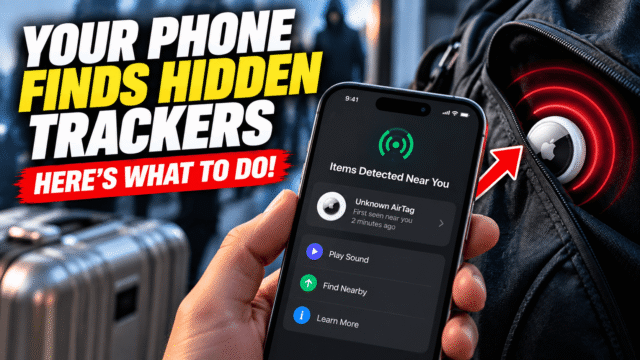
- On iPhone, alerts are automatic if the prerequisites are met, which is worth checking now rather than later: Settings, Privacy & Security, Location Services must be on; within that, System Services, Find My iPhone on; and Bluetooth on. Alerts read along the lines of “AirTag Found Moving With You”, “Unknown Accessory Detected”, or “[Item] Found Moving With You”. Tapping the alert lets you play a sound on the tracker and see its identifier.
- On Android 6.0 and later, unknown tracker alerts are built in and enabled automatically. You can also scan manually whenever you want, which is the feature most people don’t know exists: Settings, Safety & emergency, Unknown tracker alerts, Scan Now. Older Android phones can use Apple’s free Tracker Detect app from the Play Store, which finds AirTags separated from their owner that have been near you for at least ten minutes.
If you suspect something but get no alert, search physically. The places people actually hide them: wheel wells, behind the licence plate, under bumpers, the gap between hood and windscreen, inside coat pockets and bag linings, and, distressingly commonly in custody disputes, in children’s backpacks and shoes.
You Found an Unknown Tracker: What to Do
Take this in order, and read the whole section before acting, because the middle step is where advice diverges.
First, photograph it where you found it. Before touching anything, take clear pictures of the tracker in place, and note the date, time, and location. This costs you thirty seconds and it’s the step people regret skipping.
Second, identify it. Hold an NFC-capable phone against the tracker and it will typically open a page showing its serial number, and in some cases the last few digits of the owner’s phone number. Record that. If it’s been marked as lost by its owner, you may see contact details, and if there’s any chance you’re being tracked deliberately, do not use those details to make contact.
Third, decide whether to disable it, and here’s where honest advice splits. Safety organisations generally recommend disabling the tracker immediately so it stops reporting your location, which on an AirTag means pressing down on the stainless steel back, rotating counterclockwise, and removing the battery. Attorneys who handle these cases advise the opposite: that removing the battery or tampering with the device can destroy evidence, including digital information and fingerprints, and Apple’s own guidance notes that law enforcement may need the physical tracker and its serial number to pursue a case.
Both are right about different priorities. The practical resolution most advocates land on: if you are in immediate danger, stop the tracking. If you’re building a case and not under immediate threat, photograph everything, then take the intact device to the police. A middle path exists too, which is placing the tracker in a signal-blocking pouch, stopping the broadcast without dismantling anything. And if you leave a tracker active while you go somewhere, understand that you’re telling whoever placed it exactly where that is.
Fourth, report it. File a police report even if you expect little, because a documented pattern matters enormously later, and Apple has said it will cooperate with law enforcement requests for AirTag ownership information. Be prepared for the possibility that the first officer you speak to isn’t well versed in this; advocates consistently advise going up the chain rather than giving up.
And one rule throughout: don’t confront the person you suspect. Engagement is often what an abuser is seeking, and it tends to escalate the behaviour rather than end it. If this is happening in the context of a relationship, contact a domestic violence support service, who can help build a safety plan covering far more than the tracker, including the accounts and devices that usually need attention at the same time.
Protecting Your Own Stuff
For the ordinary use case, a few practical notes.
Put one in your luggage before flying. This is the single most-recommended use, and it works: knowing your bag is sitting in a specific building while an airline tells you it’s “in transit” changes the conversation entirely.
Attach them properly. A bare AirTag in a bag is fine; on keys it needs a holder, and adhesive mounts work for laptops and bikes.
Don’t treat them as anti-theft devices. A tracker tells you where your property went, and thieves increasingly know to look for them. Never approach a location yourself, which is the same rule that applies to a stolen phone: pass the information to the police.
Check the battery yearly. AirTags use a standard coin cell you can replace yourself, and a dead tracker is a false sense of security.
Quick Answers
How do I know if an AirTag is tracking me?
Your iPhone or Android phone will alert you if an unknown tracker is moving with you, provided Bluetooth and location services are on. Android users can also scan manually via Settings, Safety & emergency, Unknown tracker alerts.
Can Android phones detect AirTags?
Yes. Android 6.0 and later have built-in unknown tracker alerts under the joint Apple-Google standard, and older phones can use Apple’s free Tracker Detect app.
Should I remove the battery from a tracker I find?
It depends on your priority. Disabling stops the tracking immediately; leaving it intact preserves evidence including fingerprints, which police may need. Photograph it first either way, and prioritise stopping the tracking if you’re in immediate danger.
Do trackers work without other people nearby?
No. They rely on nearby phones to relay their location, so a tracker in an isolated area reports nothing until someone passes.
Which tracker should I buy?
The one matching your phone’s network: AirTags for iPhone, Find Hub-compatible trackers like Chipolo or Pebblebee for Android. Network density matters far more than the tracker’s own features.
The Bottom Line
Item trackers are genuinely useful and genuinely misusable, and both facts deserve equal weight. If you’re buying one, match it to your phone’s network and put it in your luggage before your next flight. If you’re worried one is following you, check that your phone’s alerts can actually fire, run a manual scan on Android, and search the places people actually hide them. And if you find one, photograph it before you touch it, weigh stopping the tracking against preserving the evidence, report it, and don’t confront anyone. The technology’s safeguards have improved a lot and they still aren’t complete, which is exactly why knowing how to check yourself is worth the ten minutes.