Table of Contents
Most months, the security update on your phone is housekeeping. You tap install, it reboots, nothing visible changes. September 2026 is not one of those months.
Google’s September update for Pixel phones fixes a flaw in the cellular modem that Google says may already be in use against real people. It doesn’t need you to click anything. Apple shipped fixes for hundreds of flaws across its devices the same month, and India’s cyber agency put out a high-severity warning about them on September 21. If you’ve been swiping away that update badge for weeks, this is the month to stop.
Here’s what shipped, what the risky one actually does, and how to check your own phone in under a minute.
What Google Fixed This Month
The September Android bulletin arrived on September 8 and covers roughly 180 issues across the whole Android ecosystem. It’s split into two patch levels: 2026-09-01 and 2026-09-05. The most severe one in the first batch is a flaw in the System component that could allow remote code execution with no user interaction at all.
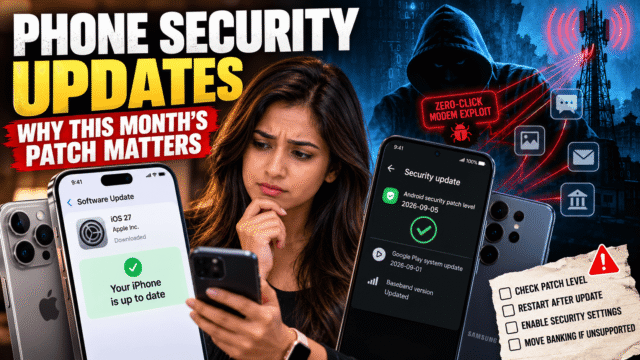
The one that matters most came a week later. On September 15, Google’s Pixel bulletin flagged CVE-2026-58704, a problem in the cellular modem that lets an attacker raise their privileges on your phone. Google’s own wording is careful and unusual: there are indications the flaw may be under limited, targeted exploitation.
That phrase is worth understanding. Google doesn’t say it lightly, and it means the bug isn’t theoretical. “Limited, targeted” normally points to spyware operators or similar actors going after specific people rather than a mass campaign, which is exactly why most people will never notice anything is wrong.
Why a Modem Flaw Is Different From a Normal One
Most phone vulnerabilities need you to do something. Open a file, install an app, tap a link. That’s why “don’t click suspicious links” is decent advice most of the time.
Modem bugs skip all of that. The cellular modem is the chip that talks to the mobile network, and it processes data before you’re involved in any way. This one is described as a proximal or adjacent attack, meaning the attacker needs to be near you on the network rather than anywhere in the world. There’s no tap to avoid and no warning to notice. The only defence is the patch.
Which brings us to the detail most people miss. The modem fix sits in the 2026-09-05 patch level, not 2026-09-01. Phones showing only the first date have the Android fixes but not the chip and kernel ones. If your phone says September 1, 2026, you’re not covered for this.
What Apple Shipped
Apple’s updates landed on September 14 alongside iOS 27, and covered around 273 flaws across all its platforms. Older iPhones that stay on iOS 26 got the same security work through iOS 26.7, so there’s no reason to jump to iOS 27 just to be safe.
The one flaw Apple confirmed was being exploited affects Screen Sharing on Macs, not iPhones. So the iPhone side of this month is less alarming than the Android side. That doesn’t make it optional. India’s CERT-In issued advisory CIVN-2026-0468 on September 21, rating the Apple flaws high severity and warning they could let a remote attacker run code on a targeted device. The fix is the same as always: install the update.
Samsung and Everyone Else
Samsung’s September package covers 90 flaws, 31 of which are Samsung’s own fixes rather than Google’s, including two the company rates critical. Samsung also notes that 40 items from Google’s bulletin don’t apply to Galaxy phones at all, which is normal since no phone uses every chip and component in the Android bulletin.
If you’re on a phone from another brand, the wait is the wait. Google publishes fixes, the chip vendors supply their parts, then each manufacturer builds, tests and releases its own version. That’s why a Pixel can get a fix in September and a mid-range phone from another brand may see the same patch level in November, or never.
How to Check Your Phone in 30 Seconds
On Android
Open Settings, go to Security & privacy, then System & updates, then Security update. The wording varies slightly by brand. You’re looking for two things: a security patch level of 2026-09-05 or later, and no pending download.
While you’re there, check Google Play system update on the same screen. This is a separate channel that pushes fixes for core Android components straight from Google, without waiting for your manufacturer. It’s one of the few protections that still works on phones whose makers have gone quiet, so let it install.
On iPhone
Open Settings, then General, then Software Update. Install anything waiting. Then tap Automatic Updates and turn on both automatic installs and the option for security responses and system files. That second switch is what lets Apple push emergency fixes between full updates, and a lot of people have it off without knowing.
What If Your Phone Is Past Its Update Date
Every phone has an expiry date for security patches, and it’s rarely advertised at the shop.
- Pixel 6 and 6 Pro: updates end in October 2026, which is next month
- Pixel 7 and 7 Pro: October 2027
- Pixel 8 and later: seven years from launch, so 2030 and beyond
- Samsung: seven years on recent flagships like the Galaxy S26 and the current foldables, but far less on budget A and M series models
- iPhone: Apple promises at least five years of security updates and in practice usually gives more
If your phone is out of support, you don’t have to panic, but you should change how you use it. Move banking, UPI and work email to a supported device. Keep Chrome and Google Play services updated, since those still get fixes independently. Don’t install apps from outside the official store. And start planning the replacement, because an unpatched phone gets less safe every month, not the same amount of unsafe.
There’s a quiet change coming that will make this harder to ignore. Google released developer tools in September that let apps check exactly which patches a phone has, right down to individual components. Banking apps can use this to block a payment on a phone that’s missing critical fixes. Expect more apps to start refusing to run on out-of-date phones.
Quick Answers
What is the September 2026 Android security patch?
It’s Google’s monthly set of fixes, published on September 8, covering roughly 180 issues. The Pixel bulletin that followed on September 15 fixed a cellular modem flaw, CVE-2026-58704, that Google says may already be under limited, targeted exploitation.
What’s the difference between the 2026-09-01 and 2026-09-05 patch levels?
The first covers Android’s own code. The second adds fixes for the kernel and chip-maker components, including the modem flaw. Only 2026-09-05 or later means you have everything from this month.
How do I check my Android security patch level?
Open Settings, then Security & privacy, then System & updates, then Security update. The date shown is your patch level. Check Google Play system update on the same screen too.
Do iPhone users need this update?
Yes. Apple’s September updates fixed around 273 flaws across its platforms, and India’s CERT-In rated them high severity on September 21. Older iPhones can stay on iOS 26 and still get the fixes through iOS 26.7.
What happens when my phone stops getting security updates?
New flaws found after that date are never fixed on your device. The phone keeps working, but it becomes a poor place to keep banking apps, UPI or work accounts, and some apps may eventually refuse to run on it.
Bottom Line
Open your settings and look at your patch level right now. Android users want 2026-09-05 or later, because that’s the level with the modem fix Google says is already being used against real targets. iPhone users want iOS 27 or iOS 26.7. If your phone can’t reach either because its update window has closed, treat that as the real finding, and move anything involving money off it before you do anything else.