Table of Contents
Your Phone’s Emergency Features: Set These Up Before You Need Them
Your phone can call an ambulance when you’re unconscious, show paramedics your blood type without your passcode, text for help from a mountain with no signal, and tell your family where you are. Almost none of it works unless you configure it first, and almost nobody has.
This takes about fifteen minutes. I’d put it ahead of every other setting on your phone in terms of value per minute spent, and unlike most tech advice, there’s no upside to postponing it.
Medical ID: The Five Minutes That Matter Most
Medical ID shows first responders your critical information from the lock screen, without your passcode, while the rest of your phone stays protected.
On iPhone: open the Health app, tap your profile picture in the top corner, select Medical ID, then tap Edit. Fill in medical conditions, allergies and reactions, medications, blood type, and organ donor status. Scroll down and add Emergency Contacts with their relationship to you.
Then the two toggles that make it work, and this is the part people miss: turn on Show When Locked, which lets a paramedic reach your information from the passcode screen by tapping Emergency then Medical ID. And turn on Share During Emergency Call, so your details are transmitted automatically when you call emergency services.
On Android: open Settings, Safety & emergency (or the Personal Safety app on Pixel), then Medical information for conditions, allergies, medications and blood type, and Emergency contacts separately. The information is reachable from the lock screen’s emergency dialler.
What to actually write in it: be specific and brief. Allergies with the reaction (“penicillin, anaphylaxis”), conditions that change treatment (diabetes, epilepsy, on blood thinners), current medications, and your blood type if you know it. And add at least two emergency contacts, since one may not answer.
Emergency SOS: Calling for Help Without Looking
On iPhone: Settings, Emergency SOS. You’ll usually see two options and can enable both. Call with Hold and Release means holding the side button and either volume button until the sliders appear. Call with 5 Presses means pressing the side button five times quickly.
One regional difference worth knowing: in India, Apple’s shortcut is three quick presses of the side button rather than five. If you’re in India or travelling there, learn the local behaviour rather than assuming.
After an emergency call ends, your iPhone notifies your emergency contacts with your location unless you cancel, which is why having contacts set up matters as much as the call itself.
Also worth enabling: Settings, Privacy & Security, Location Services, System Services, and confirm Emergency SOS location sharing is on.
On Android: press the power button five times or more quickly. Depending on setup, the phone can call emergency services or a number you choose, share your location and information with your emergency contacts, and record, back up, and share video. Configure it in the Personal Safety app, and note Google’s own caution that these features must be set up manually before they’ll work in an emergency.
One thing to practise: know how to cancel. Accidental triggers happen, and the countdown exists precisely so you can stop it. Better to discover that now than during a false alarm in a supermarket.
Crash Detection
iPhone 14 and later (with iOS 16 or later) and Apple Watch Series 8, SE second-generation, and Ultra models (watchOS 9 or later) detect severe car crashes, including front, side, and rear impacts and rollovers, in ordinary passenger vehicles.
What happens: the device sounds an alarm and shows an alert for about 10 seconds, then automatically calls emergency services after 20 seconds unless you cancel. If you’re unresponsive, it plays an audio message telling emergency services there’s been a crash and gives your location. If you have no cellular or Wi-Fi coverage, it will attempt to reach help via satellite where that’s available.
On Pixel, Car Crash Detection works on Pixel 4a and later, using location, motion sensors, and ambient sound. Enable it in the Safety app under Settings, and grant the location, physical activity, and microphone permissions it requires. If you don’t respond within 60 seconds, the phone turns on speakerphone, calls emergency services, states that a car crash has happened, and shares your approximate location, repeating the message while you can speak over it. Availability varies by country.
Both are designed for severe crashes rather than minor bumps, and both can be cancelled if you’re fine.
Satellite SOS: When There’s No Signal at All
This is the feature that sounds like marketing and genuinely isn’t.
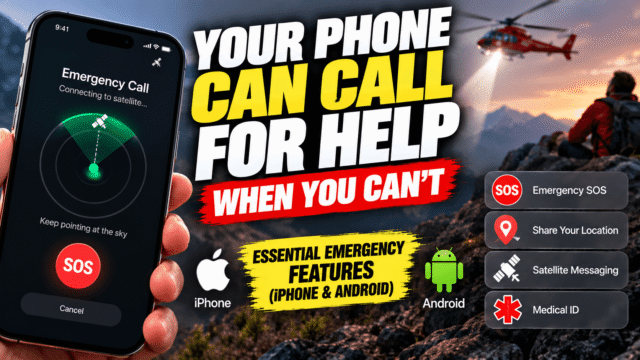
On iPhone 14 and later, if you’re beyond cellular and Wi-Fi coverage, your phone can connect directly to a satellite and text emergency services. It walks you through pointing the phone at the sky, asks a short series of questions so dispatchers get useful information immediately, then relays your location and answers. Apple has repeatedly extended free access for existing users, most recently including older iPhones, so check your own device rather than assuming a trial has lapsed.
It works. A search and rescue chief describing a real callout recounted an injured hiker miles from cell service who reached dispatch this way, with responders receiving exact coordinates and her medical status through the relayed case information.
Newer Pixel phones offer a comparable Satellite SOS, walking you through connecting and then letting you communicate conversationally through Google Messages, with availability varying by region.
The honest limits: you need a genuinely clear view of the sky, and heavy tree canopy, canyon walls, or rugged terrain can make a connection take much longer or fail. It’s a last resort rather than a substitute for telling someone where you’re going, and in genuinely remote country a dedicated satellite messenger remains the more reliable tool.
Two related features worth knowing: you can share your location via satellite in Find My to reassure family while off-grid, and in the US, Roadside Assistance via satellite connects you to AAA for breakdowns beyond coverage.
Check-Ins and Location Sharing
The features that help before an emergency becomes one.
Apple’s Check In automatically notifies a chosen contact when you arrive somewhere safely, and alerts them if you don’t. Google’s Safety Check does the same with a timer, automatically starting Emergency Sharing if you don’t respond when it expires.
Both are genuinely useful for walking home late, solo hikes, first dates, and travelling alone. And ordinary location sharing with a trusted person costs you nothing and removes a great deal of anxiety, which is a different application of the same technology we’ve written about in the context of item trackers.
The Fifteen-Minute Checklist
Do these in order, tonight:
- Fill in Medical ID with conditions, allergies, medications, and blood type.
- Turn on Show When Locked and Share During Emergency Call (iPhone).
- Add at least two emergency contacts.
- Enable both Emergency SOS shortcuts, and learn the one your region uses.
- Confirm crash detection is on if your device supports it.
- Check whether your phone has satellite SOS and read how it’s triggered.
- Set up Check In or Safety Check.
- Tell the people you listed that they’re your emergency contacts.
That last one is the step everyone forgets, and it’s free.
Quick Answers
Can paramedics see my Medical ID if my phone is locked?
Yes, if you’ve turned on Show When Locked. They reach it from the passcode screen via Emergency, then Medical ID, and the rest of your phone stays protected.
How do I trigger Emergency SOS?
On iPhone, hold the side and volume buttons, or press the side button five times, with India using three presses instead. On Android, press the power button five or more times quickly.
Which iPhones have crash detection?
iPhone 14 and later on iOS 16 or newer, plus Apple Watch Series 8, SE second-generation, and Ultra models. It calls emergency services automatically after about 20 seconds if you don’t cancel.
Is satellite SOS free?
Apple has repeatedly extended free access for existing users, including older iPhones, though terms vary by device and region. Check your own phone’s satellite settings for current status.
Does any of this work without setup?
Emergency calling works on any phone. Medical ID, emergency contacts, crash detection on Android, and check-ins all require configuration first, which is why this is worth doing tonight.
The Bottom Line
Your phone is already capable of doing the single most useful thing it will ever do for you, and it’s sitting switched off waiting for fifteen minutes of attention. Fill in Medical ID and make it visible from the lock screen. Learn your region’s Emergency SOS shortcut and practise cancelling it. Confirm crash detection is active. Find out whether your phone can reach a satellite and how. Then tell the two people you listed that you listed them. None of this can be done in the moment it matters, which is exactly why it’s worth doing in a moment that doesn’t.