Table of Contents
You checked your iPhone’s battery health, saw a number below 100%, and felt a small pang of dread. Maybe it dropped a few percent after an update and now you’re wondering if your phone is dying or if Apple is nudging you toward a new one.
Take a breath. That number is one of the most misunderstood figures on your phone, and the anxiety around it spiked this year for a specific reason: iOS 26 made battery health and exact cycle count far more visible than before, so millions of people started staring at metrics they’d never noticed, and reading failure into normal aging. Let me explain what the percentage actually measures, what’s genuinely normal at each age, which charging habits matter and which are myths, and the honest math on when replacement beats a new phone.
What the Percentage Actually Measures
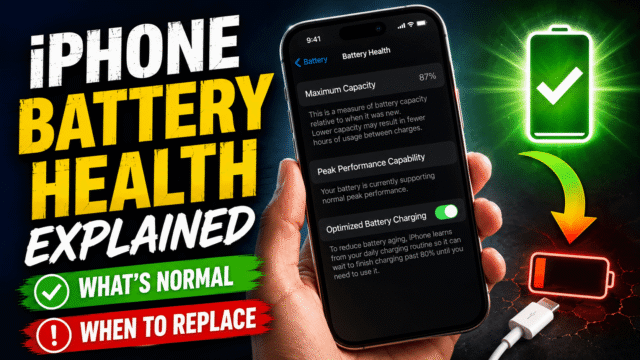
Find it under Settings, then Battery, then Battery Health and Charging. The headline figure, Maximum Capacity, estimates how much charge your battery holds now compared to when it was new. 100% is a factory-fresh cell; 90% means it holds about nine-tenths of that.
Two things people don’t realize. First, it’s not a direct hardware reading, it’s a software estimate built from voltage behavior, temperature history, and charge cycles, refined over time. That’s exactly why it sometimes drops a few percent overnight after an iOS update: the system recalibrated its estimate, not your battery suddenly aged. Second, degradation is permanent and irreversible. No app, setting, or trick restores it, and anything claiming to “recalibrate your health back up” is at best clearing a display glitch and at worst a scam.
Sitting underneath is cycle count, also now visible in that menu. One cycle equals using 100% of your battery’s capacity, not one charge. Use 50% today and 50% tomorrow, each topped back up, and that’s one cycle, not two.
What’s Normal at 1, 2, and 3 Years
Here’s the update that most older articles get wrong, and it matters enormously. Apple designed iPhone 14 and earlier batteries to keep 80% capacity at 500 cycles. But iPhone 15 and newer are designed to keep 80% at 1,000 cycles, double the endurance. Comparing cycle counts across those two generations is meaningless, and a lot of panic comes from applying old-model expectations to a newer phone.
Rough, real-world guidance:
- Year one: expect to stay in the 90s. A healthy iPhone shouldn’t fall far in twelve months, and a drop into the mid-80s within the first year, especially at a low cycle count, is worth watching.
- Year two: somewhere around the mid-80s to low-90s is completely normal. Service data on iPhone 15 Pro units shows many not hitting 80% until roughly 900 cycles, well inside spec.
- Year three and beyond: 80% or thereabouts is typical and still perfectly usable. This is the zone where you start paying attention to how the phone actually behaves rather than the number itself.
The single most important principle: judge the experience, not the digit. An iPhone at 82% that comfortably lasts your day is fine. The real warning signs are unexpected shutdowns (especially above 20%), obvious sluggishness during video calls or navigation, or the phone dropping charge alarmingly fast. Those matter more than any percentage.
The Charging Habits That Matter (and the Myths)
Let’s separate what genuinely helps from folklore, because there’s a lot of the latter.
What actually helps:
Heat control, above everything else. Sustained heat is the number one killer of lithium batteries, more damaging than any charging pattern. Keep the phone out of hot cars and direct sun, and pull thick cases off if it gets warm while charging. We’ve covered the wider overheating problem in depth separately, and it’s the same enemy here.
Optimized Battery Charging, which is on by default. It learns your routine and holds the charge at 80% until just before you normally unplug, cutting the time your battery sits full. Leave it enabled.
On iPhone 15 and later, the Charge Limit feature. You can cap charging anywhere from 80 to 100%, and keeping a daily cap around 80 to 90% is the single most effective habit for long-term health if you don’t need every last hour of runtime. Find it under Battery, then Charging.
The myths worth dropping:
Overnight charging destroying your battery. Modern iPhones stop drawing charge when full, and with Optimized Charging on, they deliberately delay reaching 100% until morning. Charging overnight is fine. Just do it on a hard surface, never under a pillow.
The obsessive 20-to-80% discipline. Staying loosely in a healthy middle range is good practice, but controlled studies show that rigidly policing every charge between exactly 20 and 80% adds real stress to your life for no measurable lifespan gain. The Charge Limit setting already handles the top end without you thinking about it.
“Let it fully drain to recalibrate.” Deep discharges to 0% stress the cell. Plugging in around 20 to 30% is gentler than running it flat.
Heat: The Real Battery Killer
This deserves its own moment because it’s so underrated. Apple’s ideal operating range is roughly 16 to 22°C (62 to 72°F), and sustained exposure above 35°C (95°F) can cause permanent damage. A single afternoon on a hot dashboard does more measurable harm than months of “imperfect” charging. If you take one habit from this article, make it keeping your phone cool, not obsessing over charge percentages.
When to Replace, With Honest Cost Math
Apple’s own guideline is to consider replacement when Maximum Capacity falls below 80%, because below that the battery may no longer sustain peak performance, and iOS may show a “Service” message. But “consider” is the operative word; a below-80% battery that still gets you through the day is a preference call, not an emergency.
Replace the battery, keep the phone, when: capacity is below 80%, you’re getting unexpected shutdowns or sluggishness, and the phone otherwise does everything you need. An Apple battery replacement runs around $99 in the US (higher for Pro models), with certified third-party options cheaper, and it buys you a year or two more life for a fraction of a new phone’s cost. If you’re on AppleCare+, replacement is free once capacity drops below 80%, so check that before paying anything.
This math is especially compelling right now. With phone and component prices climbing through 2026, a battery swap is the smart frugal move, extending a phone you like rather than paying inflated prices for a new one.
Consider a new phone instead when: the battery is degraded and the phone is old enough that it’s also slow, unsupported, or lacking features you want. At that point you’re spending $99 to prolong a device you’d replace soon anyway.
The one non-negotiable exception: a swollen battery is a safety issue, not a maintenance one. If your screen lifts at an edge, the back bulges, or the phone rocks when flat on a table, stop charging it and get it serviced immediately. That’s the one battery situation that shouldn’t wait.
Quick Answers
- Is 80% battery health bad?
No. 80% is the threshold where Apple suggests considering a replacement, but a phone at 80% that lasts your day is perfectly usable. Judge real performance, not the number. - Why did my battery health drop suddenly after an update?
Almost always recalibration of the software estimate, not sudden physical aging. iOS periodically recalculates, and updates can trigger a re-estimate. - How many charge cycles does an iPhone last?
iPhone 14 and earlier are designed for 80% capacity at 500 cycles; iPhone 15 and later for 80% at 1,000 cycles. Don’t compare cycle counts across those generations. - Does charging overnight ruin the battery?
No. iPhones stop charging when full, and Optimized Battery Charging delays hitting 100% until you wake. Charge on a hard surface and it’s fine. - Is it worth replacing an iPhone battery?
Often yes. Around $99 (free under AppleCare+ below 80%) to restore a phone you like beats buying new, particularly with 2026’s rising phone prices. Skip it only if the phone is old enough to replace anyway.
The Bottom Line
Your iPhone’s battery health percentage is a useful gauge and a terrible source of anxiety. It measures real, irreversible aging, but it drops slowly, recalibrates in ways that look scarier than they are, and matters far less than whether your phone actually lasts the day. Keep it cool, leave Optimized Charging on, cap the charge if your model allows, and ignore the overnight-charging and drain-to-zero myths. When capacity dips under 80% and you feel it in daily use, a battery swap is usually the smart, frugal fix, unless the phone was due for retirement anyway. And if the battery ever swells, that’s the one time to stop and act now.