Table of Contents
It’s peak summer, your phone is hot enough to notice every time you pick it up, and the internet’s favorite advice is circulating again: pop it in the fridge for a few minutes. Please don’t. Repair shops are currently dealing with the aftermath of exactly that advice; one UK technician reported being inundated with heat-damaged devices this heatwave, many from owners who’d tried the fridge trick after seeing it on social media, and one iPad with a heat-swollen battery actually burst into flames in his shop.
Here’s what genuinely cools a hot phone down, what quietly destroys it, and how to tell ordinary summer warmth from a phone that’s telling you something is wrong.
Why Phones Overheat (It’s Usually These Five Things)
Phones are built to operate between 0 and 35°C (32 to 95°F), and summer pushes the top of that range before you’ve even done anything. Five situations cause most overheating:
- Charging while using it. Charging generates heat on its own; add navigation, video calls, or a game on top and the phone is fighting two heat sources at once.
- Direct sunlight. A car dashboard, a pool chair, a beach towel. A parked car can pass 55°C inside, and a dark phone screen absorbs sun like a solar panel.
- The heavy-workload trifecta. GPS navigation, 4K video recording, and gaming are the three tasks that push processors hardest, and doing any of them outdoors in summer compounds it.
- Thick cases and soft surfaces. A chunky case traps heat against the back panel, and charging on a bed or couch blocks the phone’s ability to vent. Hard, flat surfaces only.
- Background churn. Big file transfers, photo library syncs, and occasionally a buggy app that recently updated can cook a phone that’s apparently doing nothing.
Cool It Down Right Now, Safely
When the phone is genuinely hot, do these in order. Under normal conditions it’ll be back to comfortable within 15 to 20 minutes.
- Unplug it first. A charging phone can’t cool; you’re feeding one of the fires.
- Take the case off. The back panel radiates heat directly once it’s exposed, and the difference is faster than you’d expect.
- Screen off, heavy apps closed. Kill the navigation, the video, the game. An idle phone with a dark screen sheds heat far faster than an active one. Airplane mode for a few minutes helps too, since radios generate their own warmth.
- Shade and moving air. A flat spot indoors, out of the sun, ideally near a fan or open window. A fan is fine, by the way; it’s moving room-temperature air, which is nothing like the rapid extreme change that causes the damage we’re about to discuss.
- Leave it alone. Modern phones dim their screens, slow their charging, and throttle their chips automatically when hot; some lock you out entirely with a cooldown warning. That’s protection working, not a fault. Let it finish.
The Fridge Myth (and the Other Ways to Damage It)
Now the part that fills repair shops every summer.
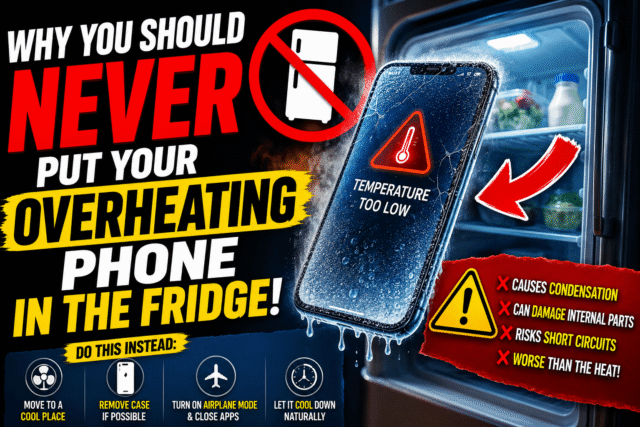
- The fridge and freezer. Cold fixes hot, right? The problem isn’t the cold itself, it’s the speed of the change. Moving a hot phone into a cold, humid box causes condensation to form inside the device, the same way droplets form on a cold drink, except this moisture lands on the display, charging port, logic board, and battery connectors, where it causes corrosion and short circuits. The cruel part is that the trick appears to work: the phone comes out cool, you carry on, and the damage accumulates invisibly. One Android owner who documented months of fridge-cooling watched his battery life collapse and his phone start overheating faster than ever, and only connected the dots afterward. Manufacturers are unambiguous on this: cool the phone gradually, never with sudden temperature extremes.
- The AC vent blast and the water pour. Same physics, same condensation and thermal-shock risk. Cooling should be gradual, full stop.
- Forcing it to keep working. Recording, charging, or gaming through a heat warning pushes a phone past the point its protections are trying to hold. The throttling is annoying; a cooked battery is expensive.
- And while we’re clearing myths: charging overnight is fine, since phones stop charging when full. Just do it on a hard surface, never under a pillow.
- When Heat Means a Real Problem
- Ordinary summer warmth is normal. These three signs aren’t.
- It overheats every time it charges, even idle and indoors. That points to a worn cable, a damaged charging port, or a failing battery. Test with a different cable and charger before blaming the phone.
- Heat with no workload. If the phone runs hot doing nothing, review recently installed or updated apps, and consider that malware also produces exactly this symptom.
- A swollen battery. If the back panel bulges, the screen lifts at an edge, or the phone rocks when flat on a table, stop using and stop charging it immediately and get it to a repair shop. Swollen lithium batteries are heat-stressed batteries, and that’s the failure mode that ends in fire.
There’s also a slow version of damage worth knowing: sustained heat permanently degrades a lithium battery’s internal structure. Every hour a phone spends baking on a dashboard is a small, unrecoverable withdrawal from its battery lifespan, even if nothing dramatic happens that day.
Stopping It Recurring
Keep it out of direct sun, especially in cars, where even a shaded bag becomes an oven. Don’t game or navigate while charging on hot days; do one at a time. Use quality chargers on hard surfaces. Slim down or temporarily remove heat-trapping cases in peak summer. And if some phone activity you love runs hot by nature, like long gaming sessions or running AI models on the device, plan for it: shade, breaks, and never simultaneously charging.
Quick Answers
Is it bad to put your phone in the fridge?
Yes. The rapid temperature change creates condensation inside the phone, which corrodes components and stresses the battery. Cool it gradually in shade instead.
How long does a phone take to cool down?
Typically 15 to 20 minutes once it’s unplugged, case off, screen off, in a shaded spot with airflow.
Why does my phone overheat while charging?
Some warmth is normal. Genuine overheating while charging usually means a worn cable, damaged port, or degrading battery. Swap the cable first to narrow it down.
Can overheating permanently damage my phone?
Yes, gradually. Sustained heat shortens battery lifespan and can affect the display and other components. A swollen battery is the urgent red flag.
Does a hot phone mean I have a virus?
Usually not, but heat with zero activity is one symptom of malware or a rogue app. Check recently installed apps if the pattern is unexplained.
The Bottom Line
A warm phone in July is physics, not failure. Unplug it, strip the case, kill the screen, and give it fifteen shaded minutes; that boring routine is genuinely the fastest safe fix that exists. The fridge, the freezer, and the AC blast feel faster and quietly bill you later in corrosion and battery life. Save your urgency for the real warning signs: overheating on every charge, heat from nowhere, and above all a swollen battery, which is the one phone problem this summer that shouldn’t wait until tomorrow.