Table of Contents
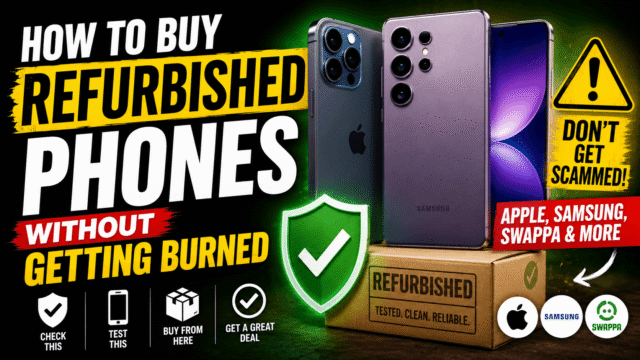
We’ve recommended buying refurbished in at least four articles this year, and for good reason: with component costs pushing new phone prices up, a two-year-old flagship at half price is the best value in consumer tech right now. But “buy refurbished” is easy advice to give and easy to get wrong, because the word itself is barely regulated and the gap between a manufacturer-certified device and a marketplace listing that merely says “refurbished” is enormous.
So here’s the piece we owed you: what the terminology actually means, where the risk concentrates, and the checks that take twenty minutes and protect you from every common way this goes wrong. One note on sources: almost everything ranking for this topic is published by companies selling refurbished phones, so I’ve stuck to what’s corroborated across independent sources and left the sales pitches out.
Refurbished vs Renewed vs Used: The Words Matter
Used means someone owned it and now it’s for sale. No inspection is implied, no grading standard exists, and the seller may be honest about a weak battery or may simply not know. Cheapest option, and every verification job becomes yours.
Refurbished and renewed both mean a process happened: inspection, testing, restoration. The critical question is who did it, because the quality of that process depends entirely on the refurbisher, and the words themselves guarantee nothing.
Certified refurbished adds a defined standard, and this is where the meaningful split lives:
Manufacturer-certified (Apple’s refurbished store, Samsung Certified Re-Newed, carrier programs) is the premium tier: genuine parts, factory-grade testing, typically a new battery and outer shell, a full one-year warranty, and devices that ship unlocked. You pay more and you buy out of most of the risk.
Third-party refurbished (Back Market, Swappa, Amazon Renewed, specialist retailers) is the value sweet spot for most people, provided the seller publishes its grading standards, states lock status plainly, and offers a real return window.
The practical rule: the further you move from manufacturer-certified toward “some listing that says refurbished,” the more of the verification work transfers to you, and the checks below become non-optional rather than nice-to-have.
Where to Buy, and Where the Risk Concentrates
The reputable end is well established: manufacturer stores, carrier certified pre-owned programs, and the major dedicated marketplaces, all of which publish grading definitions and offer returns.
The risk concentrates in peer-to-peer listings on general marketplaces, where a private seller with no inspection process meets a buyer with no protection. That’s not a blanket “never,” since careful individual owners sell perfectly good phones, but it’s precisely where the checks below stop being optional. Warning signs that should end a transaction: no clear warranty or return policy, stock photos instead of images of the actual device, a refusal to share the IMEI before purchase, a grade that doesn’t match the photos, and pressure to pay quickly or off-platform.
A universal minimum standard, corroborated across sources: a 12-month warranty is the benchmark for refurbished, and anything sold “as-is” with no returns is a different product entirely.
The Grading Letters, Decoded
Most sellers use either letters or words, roughly aligned like this: Grade A / Excellent / Pristine means near-new with no visible marks, at the highest price. Grade B / Very Good / Good means light scratches or scuffs visible on close inspection, and this is usually the value pick. Grade C / Fair means obvious cosmetic wear, dents, or noticeable screen marks, at the deepest discount.
Two honest caveats. First, grading is cosmetic and says nothing about battery or component health. Second, there’s no industry-wide standard, so one seller’s Grade B is another’s Grade A, which is why buying from sellers who publish their grade definitions matters more than the letter itself.
The insight that saves people the most regret: cosmetic grade matters far less than battery health. A pristine Grade A phone at 76% battery will frustrate you within months, while a scuffed Grade C unit at 89% will comfortably run all day. Buy the battery, tolerate the scratches, spend the savings on a case.
The 48-Hour Arrival Checklist
The moment the phone arrives, you’re inside your return window, and that window is the whole protection. Run these before you get attached to it.
1. Check the IMEI, three places. Dial *#06# to display the IMEI on screen, then confirm it matches the box and the sticker in the SIM tray. Mismatches mean parts or identity have been swapped. Then run that number through a blacklist checker, using your carrier’s tool or the CTIA stolen-phone checker in the US, to confirm it isn’t reported lost or stolen, which would make it useless on any network.
2. Confirm no account locks. The phone must arrive with no previous owner attached: on iPhone, it should reach setup with no Activation Lock prompt and show no other Apple Account in Settings; on Android, no previous Google account in Settings and no Factory Reset Protection prompt. A locked device is unusable regardless of any warranty, and it’s the single most common way refurbished purchases turn into paperweights. It’s the exact mistake we warned sellers about from the other side of the transaction.
3. Check battery health properly. On iPhone, Settings, Battery, Battery Health & Charging, where 85% or better is a good result and below 80% should be a dealbreaker unless a replacement battery is explicitly included. On Samsung, use the Samsung Members app diagnostics; on Pixel, Settings, Battery, or a third-party tool for a closer estimate. Our battery guide explains what these numbers actually mean and when a swap is worth it.
4. Test the hardware systematically, because problems hide in the components nobody checks on day one: both cameras and the flash, every speaker and both mics (record a voice memo), Wi-Fi, Bluetooth, NFC, GPS with a map, wired and wireless charging, every button, the fingerprint or face unlock, and the whole touchscreen surface including edges. Fifteen minutes now beats discovering a dead mic in month three.
5. Confirm carrier compatibility and unlock status. Put your SIM in and confirm calls, texts, and data all work on your network, especially if the device came from another country, where band support can differ.
6. Keep your evidence. Screenshot the listing, the stated grade, and the warranty terms at purchase. If a dispute happens, that’s what settles it.
What a Fair Price Looks Like Right Now
Two forces are pulling in opposite directions this year, so keep the “as of” in mind: new phone prices are rising with the memory squeeze, which pushes refurbished demand and prices up, while each new launch (iPhone in September, Pixel this month) knocks the previous generation’s used value down. The practical window that follows: the weeks right after a flagship launch are the best time to buy the outgoing generation refurbished.
As a sanity anchor rather than a promise, a well-graded phone two generations old typically lands somewhere around half its launch price, and manufacturer-certified stock commands a premium over third-party for the warranty and the new battery. If a listing is dramatically below everything comparable, assume there’s a reason and look for it in the checks above.
One more value lever: prioritize models still receiving software updates, which for iPhones generally means the last three or four generations. A cheap phone that stops getting security patches next year isn’t cheap.
When New Is Still the Right Call
Refurbished isn’t automatically correct. Buy new if you need the current generation’s specific features, if you want the longest possible support runway, if a full manufacturer warranty and the option of AppleCare-style coverage matters to you, or if the price gap on a particular model has narrowed to the point where the discount no longer compensates for the unknowns. Budget-tier phones in particular sometimes have such thin refurbished discounts that new wins outright.
Quick Answers
Is buying a refurbished phone worth it?
Usually yes, especially for flagships one to two generations old, where the discount is steep and the hardware is still excellent. The value depends on buying from a seller with published grading, a real return window, and at least a 12-month warranty.
What’s the difference between refurbished and renewed?
Practically none as terms; both imply an inspection and restoration process. What matters is who performed it and what standard backs it, which is why manufacturer-certified sits above generic “seller refurbished.”
How do I check if a refurbished phone is stolen?
Dial *#06# for the IMEI, confirm it matches the box and SIM tray, and run it through your carrier’s checker or a stolen-device database before paying.
What battery health should a refurbished phone have?
85% or above is a good result. Below 80% is a dealbreaker unless the seller explicitly includes a replacement battery.
Do refurbished phones come with a warranty?
Reputable ones do, with 12 months as the benchmark and manufacturer-certified programs typically matching new-device coverage. “As-is” with no returns is the red flag.
The Bottom Line
Refurbished is the smartest money in phones right now, and the entire risk sits in a gap you can close in twenty minutes. Buy from sellers who publish their grading and honor returns, treat the 12-month warranty as the minimum bar, and remember that battery health matters more than cosmetic grade every single time. Then, the day it lands: IMEI in three places, no account locks, battery percentage, a systematic hardware test, and screenshots of everything. Do that inside the return window and the worst case is a refund and an afternoon lost. Skip it, and the worst case is a locked, blacklisted phone that nobody can fix.