Table of Contents
iOS 27 Supported Devices: Will Your iPhone Get It? (Full List)
Short answer first, because that’s what you came for: if your iPhone runs iOS 26, it will run iOS 27. Apple confirmed at WWDC in June that not a single iPhone gets dropped this year, despite months of rumors that the iPhone 11 lineup was done. The public beta went live on July 13, and the final release lands this fall, expected in September alongside the new iPhones.
Here’s the full list, the catch hiding inside it (three different tiers of AI support that Apple doesn’t exactly advertise), and my honest take on whether the beta is worth installing today.
Every iPhone That Gets iOS 27
- iPhone 17 Pro Max, 17 Pro, iPhone Air, iPhone 17, iPhone 17e
- iPhone 16 Pro Max, 16 Pro, 16 Plus, 16, 16e
- iPhone 15 Pro Max, 15 Pro, 15 Plus, 15
- iPhone 14 Pro Max, 14 Pro, 14 Plus, 14
- iPhone 13 Pro Max, 13 Pro, 13, 13 mini
- iPhone 12 Pro Max, 12 Pro, 12, 12 mini
- iPhone 11 Pro Max, 11 Pro, 11
- iPhone SE (2nd and 3rd generation)
If your phone isn’t on that list, meaning the iPhone XS, XS Max, XR, or anything older, it stays on iOS 18 forever and won’t receive iOS 27.
Keeping the iPhone 11 alive is genuinely generous by Apple’s standards; that’s a 2019 phone getting 2026’s release. The reason fits the update’s character: iOS 27 is less about flashy new features and more about performance optimization and refining the Liquid Glass design introduced last year, work that benefits old hardware rather than straining it. The headline features are a different story.
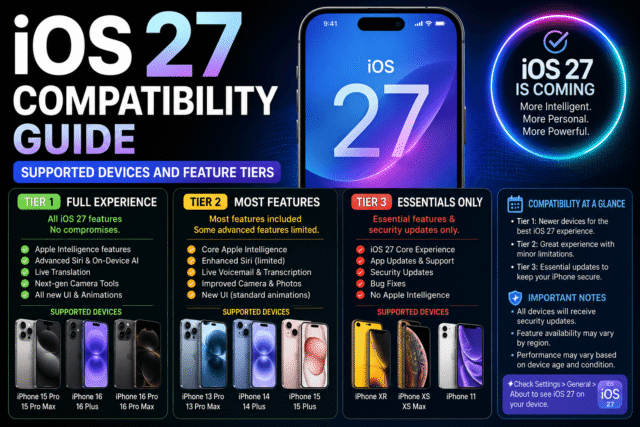
The Catch: Three Tiers of AI Support
Running iOS 27 and getting iOS 27’s marquee features are two very different things, and this year the split is sharper than ever. There are effectively three classes of iPhone under iOS 27.
Tier 1: The full experience
Only the iPhone 17 Pro, 17 Pro Max, and iPhone Air run Apple’s “most powerful on-device Apple Intelligence model,” which powers the showcase extras like expressive Siri voices and the most advanced dictation. Notably, the standard iPhone 17, a phone less than a year old, is excluded from this top tier.
Tier 2: Apple Intelligence and the new Siri AI
The rebuilt Siri and the broader Apple Intelligence feature set require an iPhone 15 Pro or 15 Pro Max, any iPhone 16, or any iPhone 17 family model. The hardware line is firm: an A17 Pro-class chip or newer with 8GB of RAM, which is what it takes to keep an on-device language model resident in memory. That’s also why there’s no software workaround coming for older phones; it’s a RAM wall, not a licensing decision.
Tier 3: iOS 27 without the AI
Everything else on the list, from the iPhone 15 and 15 Plus down to the iPhone 11 and both SE models, gets iOS 27 in full minus Apple Intelligence. The sting is sharpest for iPhone 15 and 15 Plus owners: your phone is barely two generations old and still misses the update’s headline act, because it shipped with 6GB of RAM. What you do get is real, though: the performance work, the interface refinements, the strengthened parental controls and safety features, and another year of security updates.
The 5 Features That Actually Matter
Cutting past the keynote montage, these are the changes worth caring about:
- The new Siri AI. The long-promised conversational Siri rebuild is the update’s centerpiece, powered in part by Apple’s arrangement with Google’s Gemini technology, with Apple adding an option to choose which model drives Siri and writing tools. Tier 2 hardware required, and even beta testers currently join a waitlist inside Settings to switch it on.
- Performance optimization. Apple explicitly pitched iOS 27 as a refinement year for the things iOS 26 introduced. If iOS 26 felt heavy on your older iPhone, this is aimed at you.
- Liquid Glass refinements. The divisive redesign gets a polish pass rather than another upheaval.
- Parental controls and safety. A significant expansion of child-safety and trust features, one of the update’s three stated priorities.
- Everyday AI threading. Smaller intelligence upgrades woven through Messages, Mail, and Safari rather than headline features, on supported hardware.
Should You Install the Public Beta?
It’s been available since July 13, it’s free, and my honest answer is: not on the iPhone you depend on. First-wave public betas are for the curious with a spare device, and early builds have the usual battery drain and app-compatibility quirks. There’s also a practical catch we’ve covered before: iOS 26 had a nasty habit of letting System Data swell until updates wouldn’t install, so clear meaningful free space before attempting any beta. If you do jump in, enroll through Settings, General, Software Update, Beta Updates, and know that the new Siri sits behind a waitlist even for testers. Everyone else loses nothing by waiting for the polished September release.
If Your iPhone Didn’t Make the List
An iPhone XS, XR, or older won’t get iOS 27, but it doesn’t turn into a pumpkin in September. Apple historically ships security patches for the last iOS version older devices can run for a while after cutoff, though app developers gradually raise their minimum iOS requirements, and that’s what genuinely ages a phone out. If you’re upgrading on a budget, this is exactly the niche Apple built the iPhone 17e for, and any iPhone 15 Pro or newer, including refurbished, lands you in the Apple Intelligence tier rather than just the supported list. Buy with the tiers in mind, not just the list.
Quick Answers
Will iPhone 11 get iOS 27?
Yes. The iPhone 11, 11 Pro, and 11 Pro Max all support iOS 27, despite rumors claiming otherwise.
When does iOS 27 release?
This fall, expected in September 2026 alongside the iPhone 18 launch. Apple confirms the exact date closer to release. The public beta is out now.
Does the iPhone 15 get the new Siri AI?
No. The iPhone 15 and 15 Plus run iOS 27 but miss Apple Intelligence, which needs the 8GB of RAM found in the 15 Pro and newer.
Which iPhones get every iOS 27 feature?
Only the iPhone 17 Pro, 17 Pro Max, and iPhone Air support the most powerful on-device model behind features like expressive Siri voices.
Is the iOS 27 beta safe to install?
Safe for a spare phone, unwise for your daily one. Early betas trade stability for novelty, and waiting until September costs you nothing.
The Bottom Line
iOS 27 is the rare Apple update that drops nobody: iPhone 11 and later, SE included, all make the cut. The real dividing line isn’t the list, it’s the tiers, with the new Siri AI reserved for the iPhone 15 Pro and newer and the full showcase kept for the 17 Pro and Air. Check which tier your phone lands in before September, skip the beta unless you have a spare device, and if the update is your reason to finally upgrade, aim for the AI tier rather than the bottom of the supported list.